Frequently Asked Questions#
General#
What is the difference between human-written code and AI-generated code reviews?#
- Human-written code: Direct editor integration. You trigger reviews yourself by right-clicking code, using keyboard shortcuts, or clicking buttons in the extension sidebar. No AI assistant needed—review any code directly.
- AI-generated code: For AI-assisted workflows. Reviews trigger automatically when AI generates code, or when you ask your AI assistant to review existing code. Works with Claude Code, Codex CLI, Cursor, VS Code, and other AI assistants.
I mostly write code without AI—is kluster.ai useful for me?#
Yes. Human-written code reviews are built for this. Right-click any code or press Ctrl+Shift+K to trigger a review. No AI assistant needed. See Human-written code quickstart for setup.
When should I run an on-demand review?#
Run an on-demand review before pushing changes. Use Review uncommitted changes for staged files, or Review all branch changes to review all changes made since the branch was created.
Do the two modes ever conflict or overlap?#
No. AI-generated code reviews run when AI generates code. Human-written code reviews run when you trigger them. They work independently.
What IDEs and CLI tools are supported?#
- IDE extensions: Cursor, VS Code, Windsurf, Antigravity
- CLI tools: Claude Code, Codex CLI
- Standalone CLI: kluster-cli for terminal-only workflows
See Installation for setup instructions.
What programming languages are supported?#
kluster.ai is language agnostic and can review code in any programming language, including Python, TypeScript, JavaScript, Java, Go, Rust, C++, C#, Ruby, PHP, and more.
Can I review a full codebase?#
Yes. For system-wide analysis, use Repo Reviews to scan your entire repository and find bugs that emerge from cross-module interactions. Repo reviews are designed specifically for analyzing your complete codebase as a system.
For reviewing specific changes, use on-demand reviews to check individual files, code blocks, or uncommitted changes.
Can I use kluster.ai with any AI model?#
Yes. When using an AI coding assistant, Code Reviews works with any model available in supported IDEs, including Claude, GPT, Gemini, and others.
Can I exclude files or folders from reviews?#
Currently, exclusion rules are configured at the project level through the kluster.ai platform. See Custom Rules for setting up project-specific configurations.
How can I invite a team member?#
Team management is available on Team and Enterprise plans. Log in to the kluster.ai platform and navigate to your team settings to invite members.
How frequently does kluster.ai update its vulnerability detection?#
kluster.ai sources vulnerability data from public CVE databases that are continuously updated. Detection coverage improves as new CVEs are published and ingested, rather than following a fixed update schedule.
How can I provide feedback about issues detected by kluster.ai?#
Each time a code review is done, a feedback option is available from the extension or in the platform. Your feedback helps improve detection accuracy and reduce false positives.
What should I do if kluster.ai flags a false positive?#
In on-demand IDE reviews and repo reviews, you can Ignore a false positive to permanently dismiss it from future reviews. If you want to revisit the issue later, use Snooze to temporarily hide it for 1, 7, or 30 days. Your feedback through these actions helps improve detection accuracy.
Do kluster.ai reviews improve over time?#
Yes. When you connect your GitHub repositories, kluster.ai learns rules from your repo and applies project-specific configurations. See Custom Rules for more details.
We also continuously improve our engine to perform deeper reviews, optimizing for common issues our users encounter. If you have suggestions for improvement, contact us at support@kluster.ai.
What is the difference between Instant and Deep analysis for code reviews?#
- Instant: Completes in about five seconds. Detects most issues and is suited for fast review and iteration cycles.
- Deep: Takes up to a few minutes. Conducts deeper analysis to uncover even subtle edge cases, ideal for critical code and final reviews.
Use Instant for fast iteration during development. Use Deep for final reviews, production code, or when thoroughness matters more than speed. You can configure the default for each workflow in Options.
AI-generated code#
What triggers an automatic review?#
For AI-generated code, reviews trigger automatically when your AI coding assistant generates or modifies code. This happens without any action from you. The code diff is sent to kluster.ai, and the results appear in your chat or terminal.
How does AI-generated code review handle intent verification differently than human-written code review?#
AI-generated code reviews see your original prompt to the AI, so they can verify the AI did what you asked—not just that the code runs. If you asked for Firebase auth but the AI used localStorage, the review catches it. Human-written code reviews cannot check intent because they only see the code, not your request. See this example for a real case.
Does kluster.ai apply changes automatically?#
No. kluster.ai identifies issues and suggests fixes, but doesn't modify your code directly. For AI-generated code, the AI assistant decides whether to apply them—in most cases, it will automatically incorporate the fixes. For human-written code, you apply fixes yourself using the Fix with AI button or manually. Either way, you remain in control.
Can I disable automatic reviews temporarily?#
Yes. You can disable automatic reviews from Options in the kluster.ai platform. Alternatively, you can disable the kluster.ai extension in your IDE, or for CLI tools, disable the MCP server.
Does it work with multi-file edits?#
Yes. AI-generated code reviews analyze diffs across multiple files in a single review, understanding the context of changes that span your codebase.
How does dependency checking work?#
The kluster_dependency_check tool automatically checks packages before installation. When your AI assistant suggests adding a dependency, kluster.ai validates it for known vulnerabilities before the install command runs.
How do I rollback changes made based on kluster.ai feedback?#
The changes are made by your AI assistant, not kluster.ai itself. You can revert changes in the file using your IDE undo functionality, Git commands, or simply ask the AI assistant to revert the changes.
Human-written code#
What is the fastest way to check code I just wrote?#
Select the code, press Ctrl+Shift+K (or right-click → Review with kluster.ai). Results appear in seconds with issues and one-click fixes.
Can I use kluster.ai for code reviews in pull requests?#
Yes. Check out the PR locally and either:
- Use Review uncommitted changes to scan all modifications.
- Select specific code and review it.
How do I trigger an on-demand review?#
You can trigger an on-demand review in three ways:
- Right-click selected code → Review with kluster.ai.
- Use the extension sidebar. Open the On-Demand Review section, select a mode, and click Instant Review or Deep Review.
- Select code and use the hint button. This option is not available in Cursor yet.
Can I review code I didn't write?#
Yes. On-demand reviews work on any code, including your own code, AI-generated code, or code from colleagues. This is useful for auditing existing codebases or reviewing pull requests.
Can I review a specific code block vs whole file?#
Yes. Select the code you want to review, then right-click and choose Review with kluster.ai. You can review anything from a single function to an entire file.
Can I review uncommitted changes?#
Yes. In the kluster.ai extension sidebar, open the On-Demand Review section, select Review uncommitted changes from the Mode dropdown, then click Instant Review or Deep Review. This reviews all staged and unstaged changes across your repository.
What is the difference between on-demand reviews and background auto reviews?#
- On-demand reviews: You click a button or use a shortcut to trigger a review.
- Background auto reviews (Beta, Enterprise plan): Automatically review your code for issues and suggestions as you work, without requiring you to trigger anything. Enable it from the Enabled Tools section in Options.
CLI#
Can I use kluster.ai from the command line without an IDE?#
Yes. The kluster-cli tool provides full code review functionality directly from the terminal—no IDE or AI assistant needed. Install it, authenticate with your API key, and review staged changes, diffs, or individual files. See CLI Quickstart.
How do I automate reviews in my git workflow?#
Install git hooks with kluster hooks install pre-commit|pre-push|all. Choose pre-commit to review before every commit, pre-push to review before pushing, or all for both. See Git Hooks.
Can I use kluster-cli in CI/CD pipelines?#
Yes. Use --output json for machine-readable output and check exit codes to fail builds on issues. Exit code 0 means no issues, 3 means high severity, and 4 means critical. See Reference for the full table.
Can I review files without a git repository?#
Yes. Use kluster review file <path> to review any file, even outside a git repository. See Review Commands.
Repo reviews#
What are repo reviews and how are they different from other review modes?#
Repo reviews analyze your entire codebase as a system instead of reviewing individual changes. They find bugs that emerge from interactions across modules—issues that don't show up in PR-level reviews because they're only visible when you examine how multiple parts of your code work together.
Other review modes (on-demand and automatic) check specific changes you make. Repo reviews scan everything to catch cross-module bugs, state inconsistencies, bypassed validation checks, and system-wide problems.
How long does a repo review take?#
Depending on repository size, repo reviews take several minutes. You'll receive an email notification once the analysis completes. You can close the page and come back later—the review continues running in the background.
Can I run repo reviews on private repositories?#
Yes. Repo reviews work with both public and private repositories on GitHub, GitLab, and Bitbucket. The connection is secure and respects your repository permissions.
Where can I access repo reviews?#
Repo reviews are available in the web dashboard at platform.kluster.ai/repo-reviews and via kluster-cli. After connecting your GitHub, GitLab, or Bitbucket repository, you can run kluster review repo start to trigger analysis and kluster review repo show to check results from terminal. See Repo reviews from CLI.
What do the Fix with AI, Snooze, and Ignore actions do?#
When reviewing bugs found by kluster.ai, each issue has actions to help you manage findings:
- Fix with AI: Generates an AI-powered fix suggestion. In IDE on-demand reviews, the fix is applied with one click. In repo reviews, you get a prompt to paste into your AI assistant.
- Snooze: Temporarily hides the issue for a selected duration (1 day, 7 days, or 30 days). The issue reappears automatically after the snooze period expires. Use this for issues you plan to address later.
- Ignore: Permanently dismisses the issue. It will not reappear in future reviews. Use this for false positives or accepted risks.
These actions are available in on-demand IDE reviews and repo reviews.
Activation codes#
What are activation codes?#
Activation codes provide promotional credits for kluster.ai plans. When you redeem a code during checkout, the credit is applied to your subscription.
What do I need before redeeming an activation code?#
Before redeeming an activation code, ensure you have:
- A kluster.ai account — Sign up on the kluster.ai platform if you don't have one
- kluster.ai installed in your IDE — Follow the Installation guide to set it up
- An activation code — One that matches the plan you want to subscribe to
How do I redeem an activation code?#
Follow these steps to redeem your activation code:
-
Log in to your kluster.ai account
-
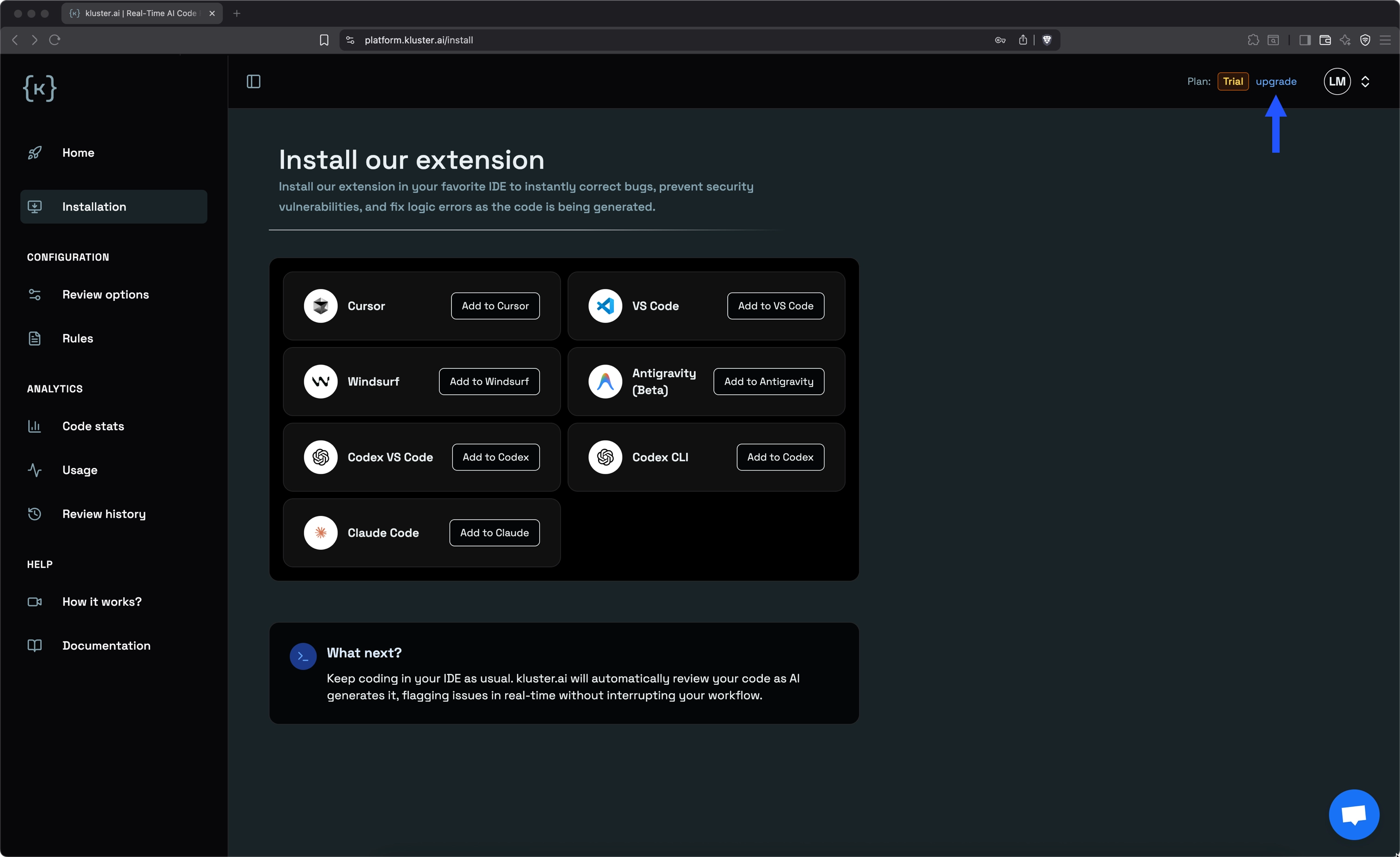
Click the upgrade button in the top right corner of the platform
-
On the plans page, click Start Max Plan
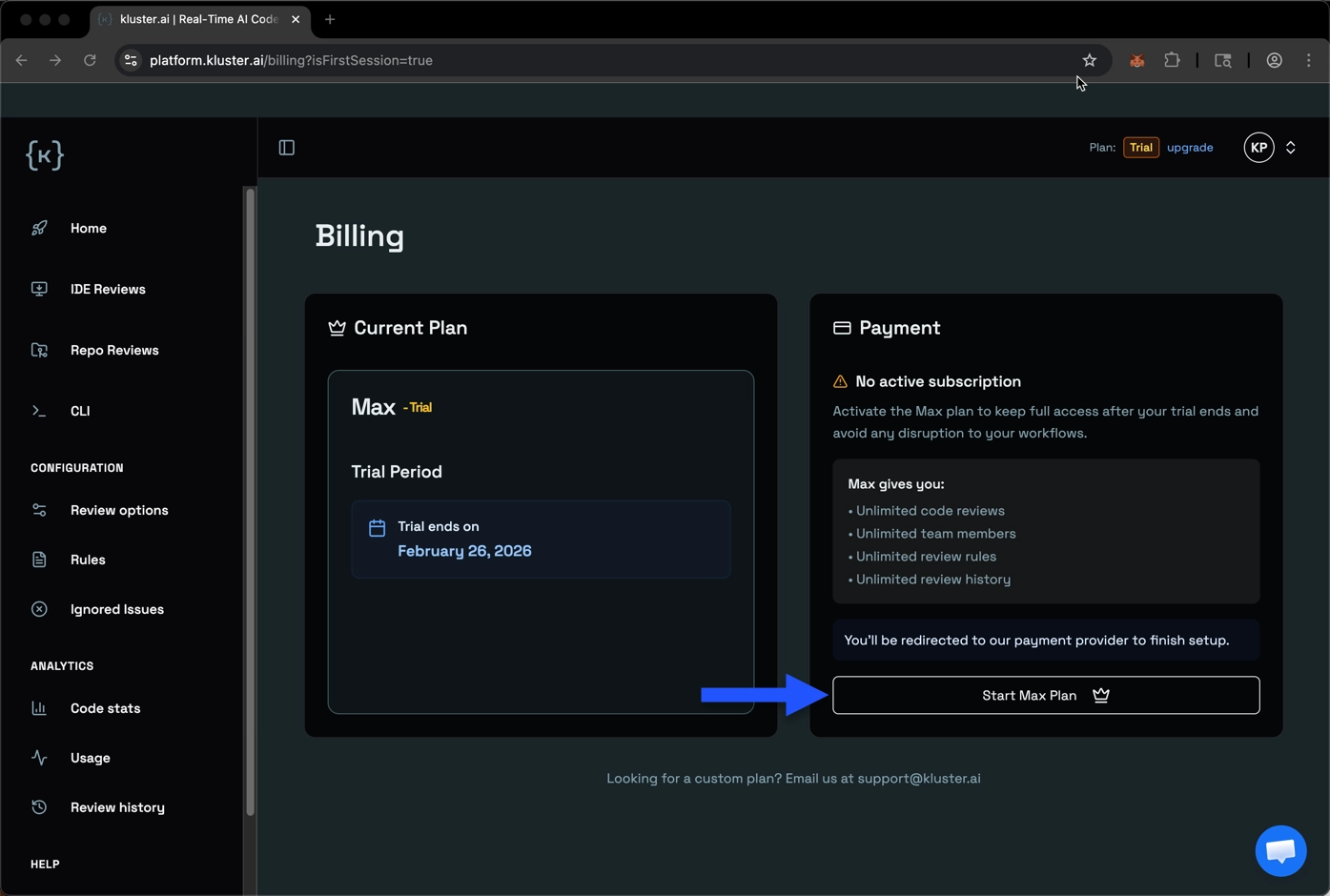
You'll be redirected to the Stripe checkout page.
-
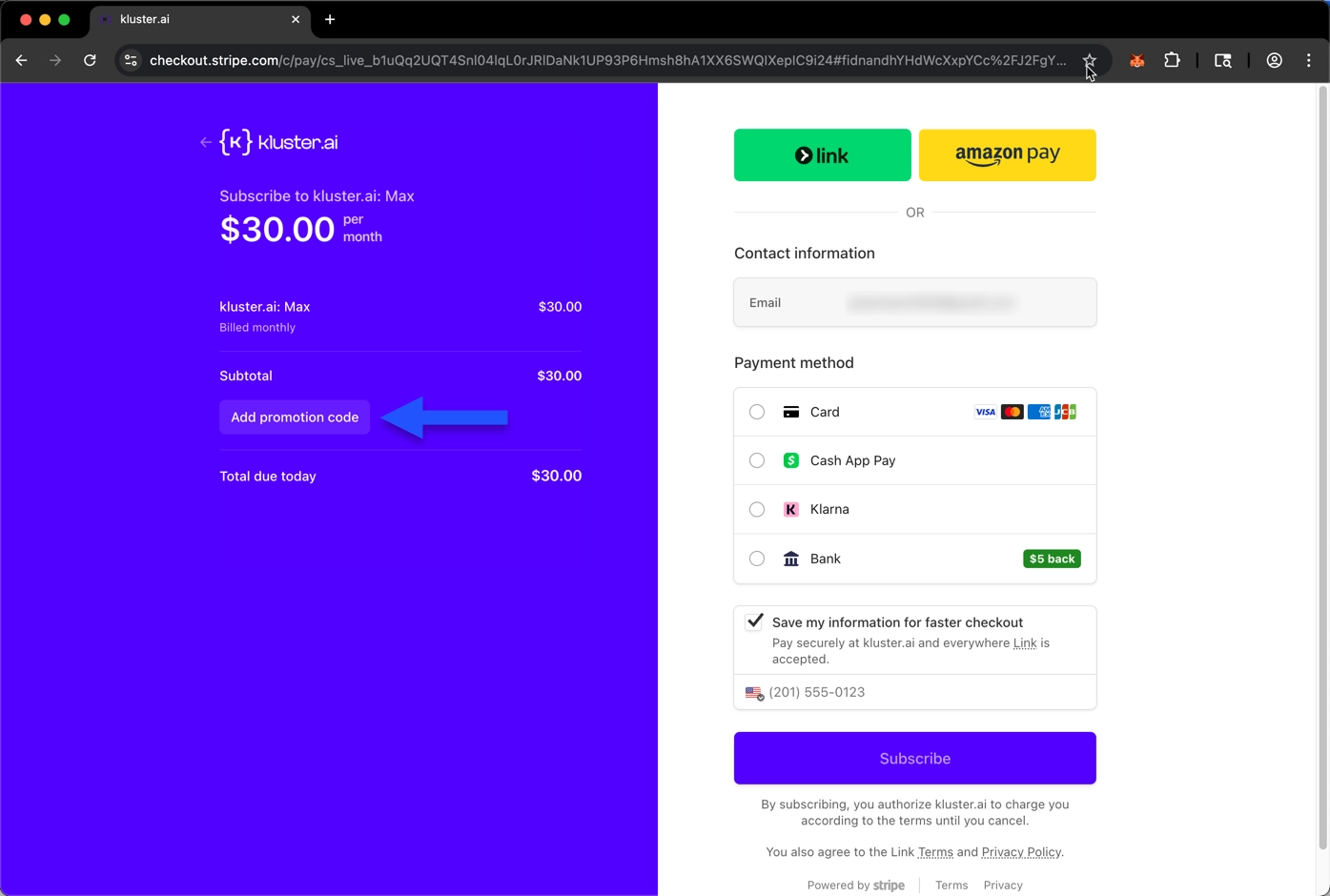
On the Stripe checkout page, click the Add promotion code section and paste your activation code
-
Once you apply the code, Stripe will validate it and show the discount applied. The total due today will reflect the promotional credit
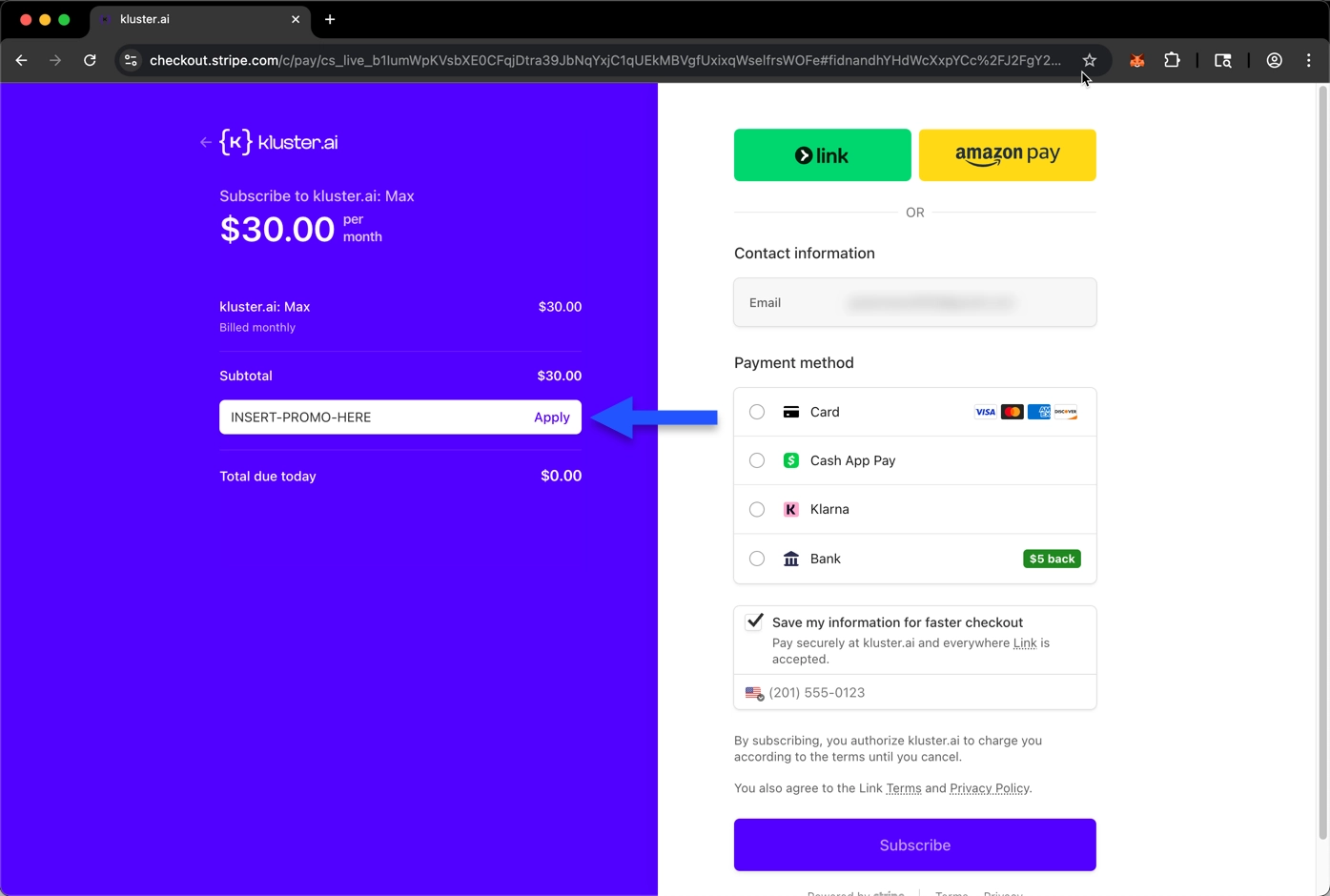
Complete the checkout process by clicking Subscribe. Your promotional credits will be immediately applied to your account.
What if my activation code isn't working?#
If you run into issues redeeming an activation code, click the Support button in the lower-right corner of platform.kluster.ai for assistance.